Building trust with Claude: from principles to memory
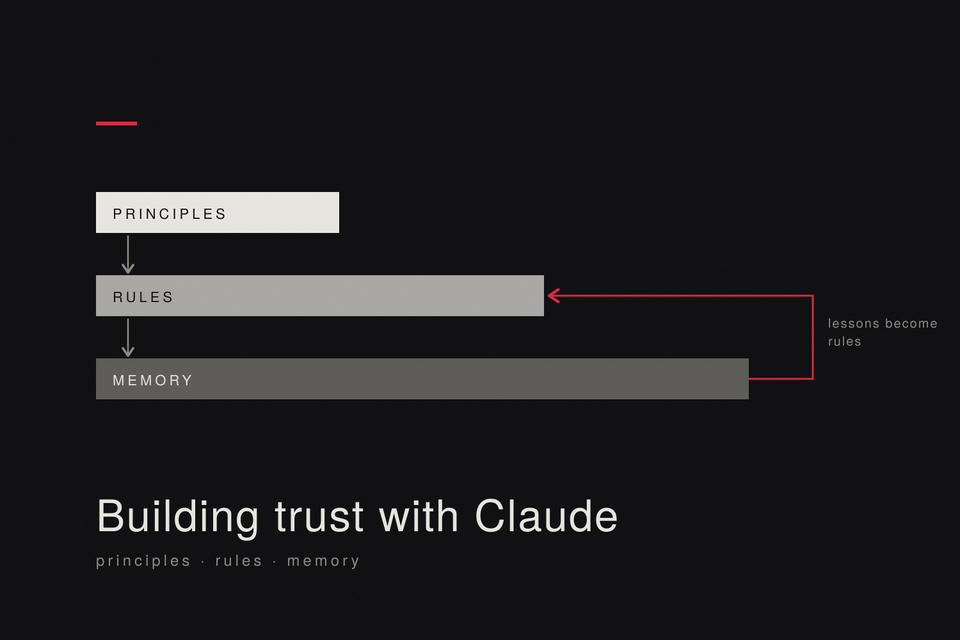
Claude starts every session knowing nothing about how you work. The goal of this procedure is practical: a tool whose behaviour you can rely on. The method is the one you use with a colleague. You agree on principles, write the rules down, give it a memory, and check what it does.
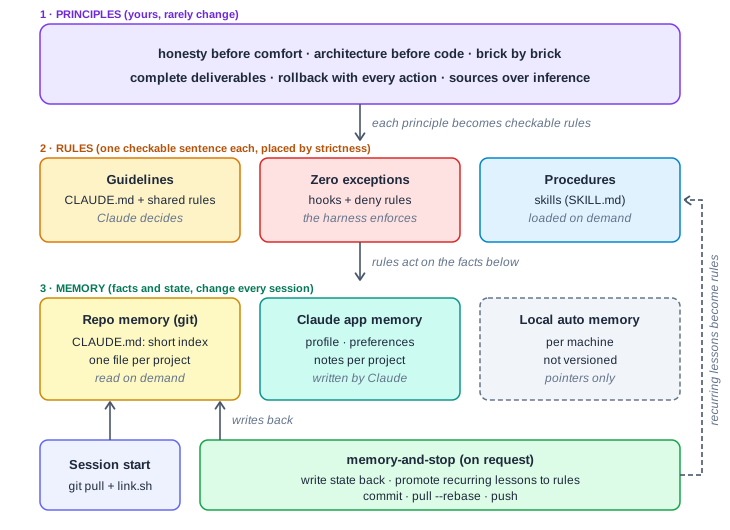
Principles, rules and memory: the three layers and the loop that feeds them
The idea: trust as a design goal
Trust here does not mean blind confidence. It means calibrated reliability: you know what to expect, you can verify it, and the tool tells you when it cannot deliver. That needs three things:
- Shared principles: what the tool should aim for, written by you.
- Shared memory: what it should know about you and your projects without being told again.
- Verifiability: a way to check that it did what it said, and a report of what it did not do.
Two limits shape the method:
- You cannot rewrite the model's own values. You configure its behaviour inside them. Your principles are a layer on top, not a replacement.
- Instructions are context, not guarantees. The official documentation says Claude may decide that a line in
CLAUDE.mddoes not apply. Trust therefore rests on enforcement for the rules that matter, not on good will.
One more condition is easy to miss: the tool must stay able to disagree with you. A memory tuned to please you lowers trust. This is why the first principle below is honesty before comfort, and why no rule in the memory says "agree with me". Agreement needs a reason, and so does disagreement.
How the layers fit together
- Principles are your stance. They are few, written once, and rarely change.
- Rules turn each principle into a sentence someone else could check. Each rule goes where its strictness requires: a guideline, a hook, or a skill.
- Memory holds the facts and the state of your projects. It changes every session.
At the end of a session, what you learned goes back into memory, and a lesson that repeats is promoted to a rule.
Part 1: from principles to rules
1. Write your principles
Five to eight lines. A principle passes the test if it would still be true in three months and does not depend on one project. Examples:
- Honesty before comfort.
- Architecture before code.
- One isolated, tested brick at a time.
- Complete deliverables only.
- Every modifying action ships with its rollback.
- Claims rest on sources, gaps are not filled by inference.
2. Derive checkable rules
For each principle, write one to three sentences that another person could verify:
| Principle | Rule |
|---|---|
| Honesty before comfort | A disagreement is stated with its reason, and so is an agreement. |
| Architecture before code | No code is written before the plan is validated. |
| One brick at a time | One feature is built, tested and delivered before the next starts. |
| Rollback with the action | Any change that modifies a system comes with its rollback procedure. |
| Sources over inference | When something cannot be guaranteed without the real environment, say so explicitly. |
A rule like "write clean code" fails the test. "Run the tests before reporting completion" passes it.
3. Place each rule by strictness
Ask the questions in this order:
- Can this rule have exceptions? No: make it a hook or a deny rule. Claude Code applies those every time.
- Is it a multi-step workflow you trigger? Yes: make it a skill.
- Otherwise: a line in
CLAUDE.md, or intransverse-rules.mdif it matters only for some tasks.
CLAUDE.md is context, not enforcement: Claude can decide a line does not apply. If you keep rewording a line that Claude still misses, it belongs in a hook.
Part 2: the memory
4. Decide where each kind of fact lives
In this setup the Claude app and Claude Code do not share a memory, so decide once:
| Kind of fact | Home |
|---|---|
| Principles and rules | The config repository. They live once, here. |
| Project state, decisions, pitfalls | One memory file per project, in the repository. |
| Chronological history of a big project | A journal file next to it, read on demand. |
| How you want answers (tone, length, language) | The Claude app preferences, plus a short copy in CLAUDE.md. |
| What Claude learns about you in chats | The Claude app memory. Review it from time to time. |
| Facts that belong to one machine | Claude Code's local automatic memory, as pointers only. |
5. Create the config repository
mkdir -p ~/my-config/{memory,skills,hooks}
cd ~/my-config && git init
touch CLAUDE.md memory/transverse-rules.md
Use a private remote while you iterate. Never commit secrets, tokens or real hostnames.
6. Write the global CLAUDE.md
Target under 200 lines: the official documentation says longer files cost context and reduce how well instructions are followed. Keep only what Claude cannot work out from the code:
# Principles
- Honesty before comfort.
- Architecture before code.
- Every modifying action ships with its rollback.

# Rules
- No code before the plan is validated.
- Never disable TLS verification, even in dev.
- Never delete or stop anything without explicit approval for that exact action.
- When several approaches are valid, list options and trade-offs first.

# Project index (read the file before working on a project)
- homelab -> ~/my-config/memory/01-homelab.md
- blog    -> ~/my-config/memory/02-blog.md
- Cross-project rules -> ~/my-config/memory/transverse-rules.md
Do not use @imports for the project files: imported files load together with the parent, so they give back the context you are trying to save.
7. Add one memory file per project
memory/NN-slug.md holds the state, decisions, pitfalls and procedures of one project. For a large project, add NN-slug-journal.md for the log, and keep a table of contents with line numbers at the top of the short file. Rules for every project go in memory/transverse-rules.md.
8. Turn repeated procedures into skills
Create skills/<name>/SKILL.md for anything you paste into chat for the third time. The description line decides when Claude loads it, so write it as a trigger. The closing routine is the first skill to write:
---
name: memory-and-stop
description: Capitalise the session when the user says "memory and stop" or "save to memory".
---
1. git pull the config repo.
2. Update the project file: decisions, pitfalls, progress, validated but unexecuted plans.
3. If the same correction came up twice, turn it into a rule and place it (step 3 of the procedure).
4. Move rules that apply everywhere to transverse-rules.md.
5. Update reusable methods instead of duplicating them.
6. Fix or delete memory entries that are now wrong.
7. Commit with a short imperative message, git pull --rebase, push.
8. Report what was saved, where, and what was not saved and why.
9. Link the repository into ~/.claude
Save this as link.sh at the root of the repository. It backs up an existing CLAUDE.md once and never overwrites it silently:
#!/usr/bin/env bash
set -euo pipefail

repo="$(cd "$(dirname "$0")" && pwd)"
mkdir -p "$HOME/.claude/skills"

target="$HOME/.claude/CLAUDE.md"
if [ -e "$target" ] && [ ! -L "$target" ]; then
  mv "$target" "$target.bak"
fi
ln -sfn "$repo/CLAUDE.md" "$target"

for dir in "$repo"/skills/*/; do
  [ -f "${dir}SKILL.md" ] || continue
  ln -sfn "${dir%/}" "$HOME/.claude/skills/$(basename "$dir")"
done
chmod +x link.sh && ./link.sh
ls -l ~/.claude ~/.claude/skills
Rollback: delete the symlinks only. The repository stays untouched, and CLAUDE.md.bak holds your previous file.
10. Enforce the rules with no exceptions
Save this as hooks/block-destructive.sh:
#!/usr/bin/env bash
cmd="$(jq -r '.tool_input.command // ""')"
pattern='(^|[;&|[:space:]])(rm|rmdir|shred|mkfs|dd)[[:space:]]|git[[:space:]]+push[[:space:]].*--force|kubectl[[:space:]]+delete'

if printf '%s' "$cmd" | grep -Eq "$pattern"; then
  echo "Blocked: destructive command. Ask the operator for explicit approval." >&2
  exit 2
fi
exit 0
Register it in ~/.claude/settings.json:
{
  "hooks": {
    "PreToolUse": [
      {
        "matcher": "Bash",
        "hooks": [
          { "type": "command", "command": "$HOME/my-config/hooks/block-destructive.sh" }
        ]
      }
    ]
  }
}
Test it: ask Claude to run rm on a throw-away file. The command must be refused. A text pattern is a safety net, not a guarantee, so add deny rules in the permission settings for anything critical.
11. Run the loop
- Start of every session:
git pullin~/my-config, then./link.shif skills were added. A machine that skipped it works on stale memory. - End of a session: say "memory and stop". The skill writes the state back, promotes repeated lessons to rules, commits and pushes.
What builds trust at each layer
| Layer | What it gives you | Where it lives |
|---|---|---|
| Principles | A shared aim, written down | Principles section of CLAUDE.md |
| Rules | Statements you can check | CLAUDE.md, transverse-rules.md |
| Memory | Context without repeating yourself | Project files in the repository |
| Enforcement | A guarantee that does not depend on Claude's choice | Hooks and deny rules |
| Reporting | A statement of what was done and what was not | Step 8 of memory-and-stop |
| Escalation | A human decision on anything irreversible | The "never delete without approval" rule |
Extend autonomy only where a rule has held across several sessions. Start with Claude asking before it acts, and relax that permission by permission, as the record grows.
Evidence from my own setup
This is one setup, measured after the fact, with no control group. It shows that the method gets used and maintained, not that its output is better.
Figures for the configuration repository behind this post, collected by Claude Code under a read-only brief:
| Measure | Value |
|---|---|
| Span | 95 days, first to last commit |
| Commits | 611, on 88 distinct days |
| Tracked files | 82, about 17,000 lines, 98% Markdown |
| Project memory | 54 project files and 8 journals |
| Skills | 6, the first one ten weeks after the start |
| Fix commits | 13 (2.1%) |
What the numbers say:
- Daily use. Commits land on about 93% of days. They are many and small, mostly memory updates rather than code.
- The memory corrects itself. Almost all of the 13 fixes repair the memory: a wrong storage type, a default branch documented incorrectly, a note that had become false. A memory that holds errors is normal. What counts is that they are found and fixed in the open, with a history.
- The structure grew with use. Per-project detail moved out of the global file in early September. Shared rules and the first skills appeared in October.
Where my own setup differs from this procedure:
- My global
CLAUDE.mdis currently 645 lines, above the 200-line target. - I have no hooks yet. The "never delete" rule is still a sentence.
What I did not measure is working time. Session transcripts are purged automatically, cover only part of the period and mix several projects, so any hour count would be a guess.
Confidentiality, security and privilege review
My source of truth is a private, self-hosted Gitea, used daily. For anyone who cares about confidentiality, this is a load-bearing brick: the history, the rules and the memory sit on a server I control, not on a public platform. What is public is a separate, anonymised template.
A private repository protects storage and history. It does not protect what Claude reads: anything that passes through a session is sent to the model provider. The procedure therefore has two sides.
Keep sensitive things out of reach
- Never put secrets in
CLAUDE.md, memory files or skills. Keep them in a secret store and reference them. - Use placeholders instead of real hostnames, addresses and client names in any file Claude loads or that you publish.
- Session transcripts are stored on your machine in plaintext, including file contents and command output. Check what is kept and purge what you do not need:
claude purgedeletes the state Claude Code holds for one project.
Review privileges on a schedule
- List what the tool can do: permission rules, hooks, connected tools, tokens.
- Give it the least access that works: a dedicated account or token, limited to the repositories it needs, with an expiry date and no admin rights.
- Remove whatever has not been used in the last month.
- Rotate tokens, and revoke at once any token that appeared in a transcript.
- Write the date of the review in the memory.
Check the result
ls -l ~/.claude/skillsshows links into the repository.- In a session,
/contextlistsCLAUDE.mdamong the memory files. - A forbidden command is refused by the hook.
- On a second machine,
git pull && ./link.shgives the same behaviour. - After a session, you have a report that says what was saved and what was not.
- The last privilege review is dated, and no secret appears in any file Claude loads.
Limits of the method
- A rule in
CLAUDE.mdcan still be missed. Only hooks and deny rules are guaranteed, and a text pattern in a hook can be bypassed. - Memory goes stale. Review the files from time to time, because contradicting instructions make Claude pick one arbitrarily.
- Trust is earned per kind of task. A good record on infrastructure notes says little about a destructive operation.
Sources
- How Claude remembers your project
- Best practices for Claude Code
- Extend Claude Code
- Hooks guide
- Explore the .claude directory
A fuller, anonymised template: ai-methods.

Member discussion